
How to Submit Your Website to ChatGPT Business Hub
ChatGPT has a new place for businesses, and yours could have a spot waiting!
С ChatGPT Business Hub, brands can claim their business, manage important information, and see how people discover them through ChatGPT.
Wondering how to submit your website to ChatGPT Business Hub? We’ve got you. Here’s how to get started, complete verification, and make the most of your profile.
Основные выводы
- ChatGPT Business Hub lets eligible businesses claim or create a business profile.
- Verification confirms you’re authorized to represent the business.
- Approved businesses can manage their information and explore available engagement insights.
- Claiming a profile doesn’t guarantee more visibility in ChatGPT.
What Is ChatGPT Business Hub?
In November 2026, OpenAI introduced Businesses in ChatGPT, giving eligible brands a dedicated place to manage their presence on the platform.
Through Business Hub, you can claim your business, update important details, share product information, and see how people engage with your brand in ChatGPT.
For business owners, that’s a welcome addition. Customers are already using AI to research products, compare services, and explore unfamiliar brands. Having a place to manage the information you share with ChatGPT is a useful opportunity.
And the nice part? You can start with the basics.
How to Submit Your Website to ChatGPT Business Hub
Ready to give it a go? Here’s how the process works.
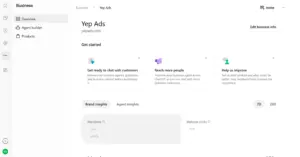
Step 1: Open ChatGPT Business Hub
Источник: Yep’s OpenAI Ads Manager Beta
Посетите ChatGPT Business Hub and sign in to your ChatGPT account.
You’ll find the option to search for your business and begin the claiming process.
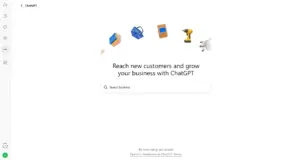
Step 2: Find or Add Your Business
Search for your business and select the correct listing.
If it’s not there, eligible online businesses may be able to add a new one. Currently, local stores and restaurants can only claim existing listings in the United States.
If someone has already claimed your listing, Business Hub also provides options to dispute ownership.
Источник: Yep’s OpenAI Ads Manager Beta
Step 3: Verify Your Business
Источник: Yep’s OpenAI Ads Manager Beta
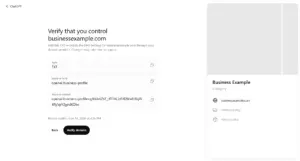
Now it’s time to confirm you’re authorized to represent your business.
Depending on your listing, verification options may include:
- Электронная почта: Receive a code at your business email.
- Phone: Verify through a text or automated call.
- Domain: Add a DNS TXT record to your website’s domain settings.
- Shopify: Connect your Shopify store.
If you’re wondering about DNS, don’t worry. It’s simply a way to confirm you control the website. Your website administrator can help if needed.
OpenAI reviews your claim and notifies you of the outcome.
Step 4: Complete Identity Verification
Once your business claim is approved, you’ll also need to verify your identity through Persona before publishing changes or accessing insights.
Follow the prompts to provide the requested identification or business documents. OpenAI will review your submission and let you know when it’s approved.
Step 5: Update Your Business Profile
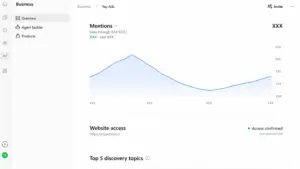
Источник: Yep’s OpenAI Ads Manager Beta
Lovely, now you can give your profile some attention.
Review your website URL, business description, logo, products, services, and relevant policies.
Keep everything accurate and easy to understand. Think of the details someone would appreciate knowing before visiting your website or exploring your brand.
Updates are reviewed before publication, so they may not appear immediately.
What Happens After Verification?
Once approved, you can explore more of what Business Hub offers.
Its Блог feature can show aggregated information about business mentions, website clicks, and topics associated with customer discovery.
Eligible businesses may also connect product feeds or explore Business Agents, which allow customers to have a separate conversation with a business.
These features have their own availability requirements, but they’re worth keeping on your radar as Business Hub develops.
Give Your Website a Little Extra Attention
While you’re updating your profile, why not give your website a quick checkup too?
Make sure product descriptions, services, and business information are clear and current. It’s also worth checking whether your site allows OAI-SearchBot, the crawler OpenAI uses for ChatGPT search.
Our guide to getting found on ChatGPT explores how helpful content and website structure can support AI discoverability.
Claiming your business gives you a place to manage information directly, while your website continues helping people learn about what you offer.
Часто задаваемые вопросы
Can I submit my website directly to ChatGPT?
You can claim an eligible business or add an eligible online business through Business Hub. However, it isn’t a general website indexing submission tool.
Is ChatGPT Business Hub free?
You don’t need a paid advertising account or ChatGPT Enterprise agreement to claim an eligible business. OpenAI’s current guidance doesn’t list a separate claiming fee.
How long does verification take?
It varies depending on the verification method and review process. OpenAI notifies you when a decision is made or additional information is needed.
For more help, see the official setup guide.
Will claiming my business improve its visibility?
Claiming helps you manage your business information, but it doesn’t guarantee more mentions or recommendations in ChatGPT.
Заключительные размышления
ChatGPT Business Hub gives brands a useful new place to manage their information as people discover products and services through AI.
The process is straightforward: find your business, complete verification, and keep your profile looking its best.
And when you’re ready to reach customers across more digital channels, Мы can help you build a performance marketing strategy around meaningful growth.
Вам также может понравиться
Поделиться
